Lightspeed reporting shows sales, item and staff performance per location — according to the price page, from the Basic plan upwards; Lightspeed advertises multi-location management in the Pro plan at €249/month (German price page, as of 10 November 2026). DISH provides comparable basic reports for a €69/month licence. For a single restaurant that is often enough. As soon as food cost, labor cost and forecasting come into play, you need a controlling layer on top of the POS.
Over the past few years I've worked with quite a few POS systems, and most of them can do more than their operators use. The reporting is in there, but it only opens up if you've booked the right plan or know where to look in the menu. This article sets out what POS reporting in Lightspeed and DISH actually delivers, when it starts to cost extra and where the line runs between a POS report and real controlling — whichever vendor you use.
Table of contents
- What does POS reporting show in Lightspeed and DISH?
- When does multi-location reporting cost extra in Lightspeed?
- Where does POS reporting stop?
- Is the POS report enough for a single restaurant?
- What does the controlling layer Kiosa adds on top actually do?
- What Kiosa is not
- What's the most common mistake I see in multi-location businesses?
- FAQ
- Your next steps
What does POS reporting show in Lightspeed and DISH?
POS reporting is the analysis built directly into the POS system — not a separate tool, but a menu item in the POS itself. In Lightspeed the module is called "Advanced Insights": sales and item performance per location, a menu quadrant that sets best-sellers against poor performers, void and discount patterns, plus "Lightspeed AI" for natural-language queries instead of fixed report views; according to the price page, both are included in all plans. DISH lists real-time sales and stock data plus Z reports (lightspeedhq.com, dish.co, both German pages, accessed 10 November 2026).
So both systems can do considerably more than show a daily sales figure. The question isn't whether the data is there — it is, in every modern POS. The question is whether your plan unlocks it and whether it's useful beyond a single location. That's where things start to differ.
Other POS systems come with their own reporting too. In this article we focus on Lightspeed and DISH because their plan structures are public and therefore verifiable.
When does multi-location reporting cost extra in Lightspeed?
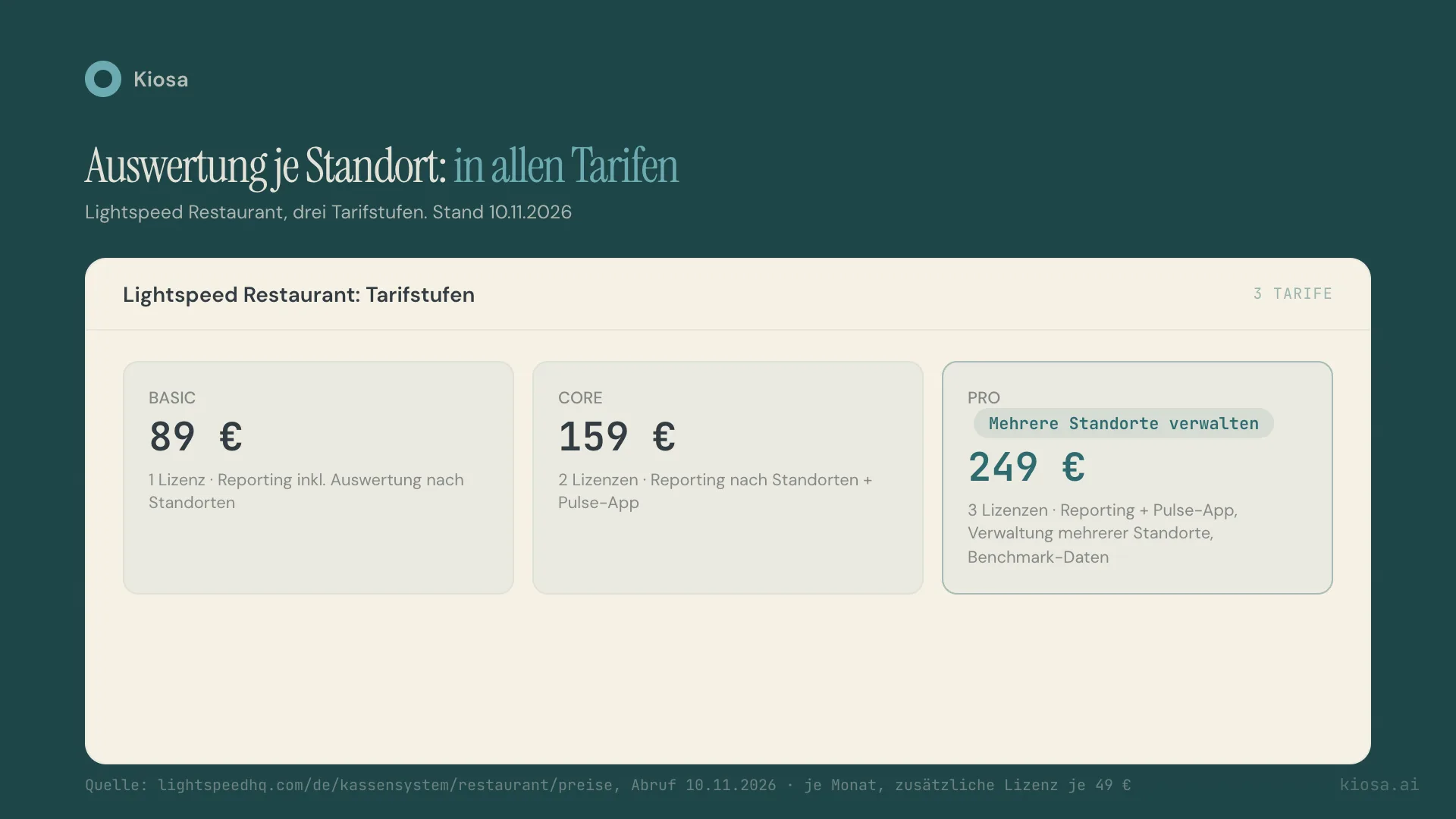
This deserves a close look, because the answer isn't quite as simple as "reporting costs extra". On its German price page, Lightspeed Restaurant has three plans: Basic at €89/month with one licence, Core at €159/month with two licences and Pro at €249/month with three licences, with additional licences at €49 each. According to the vendor, reporting including "performance analysis by location" and the mobile Pulse app are included in all three plans. Lightspeed advertises "management of multiple locations, benchmark data and new sales channels" in its description of the Pro plan at €249/month (lightspeedhq.com/de/kassensystem/restaurant/preise, accessed 10 November 2026).
For a business with two or more locations, that means: you get per-location reports on every plan. What exactly you need the Pro plan's multi-location management for is something to clarify with the vendor before choosing a plan.
On its German price page, DISH lists a €69/month licence fee for its basic package, plus hardware from €1,684 one-off. The vendor doesn't show a separate price tier for cross-location reporting on its public price page — if you run several DISH locations, ask sales directly (dish.co/DE/de/kassensystem-gastronomie, accessed 10 November 2026).
That in itself isn't a criticism of Lightspeed. Bundling multi-location features and pricing them higher than a single-terminal POS is an understandable model — building and maintaining software for several sites genuinely takes more work. What matters is that you know this before choosing a plan, not after.
Where does POS reporting stop?
Even on the most expensive Lightspeed plan, POS reporting remains what the name says: an analysis of the POS's own data. Sales, items, staff ranking, void patterns — everything that happens at the terminal is captured and presented cleanly. What stays outside are the systems the POS doesn't know about: supplier invoices, food cost per item, actual labor cost from payroll, bookkeeping entries.
That separation isn't a flaw, it's architecture. A POS is built to handle payments and orders. It's supposed to print checks reliably, not reconcile food cost against supplier invoices. That's exactly why there's a gap between the POS report and controlling, however good the built-in reporting is.
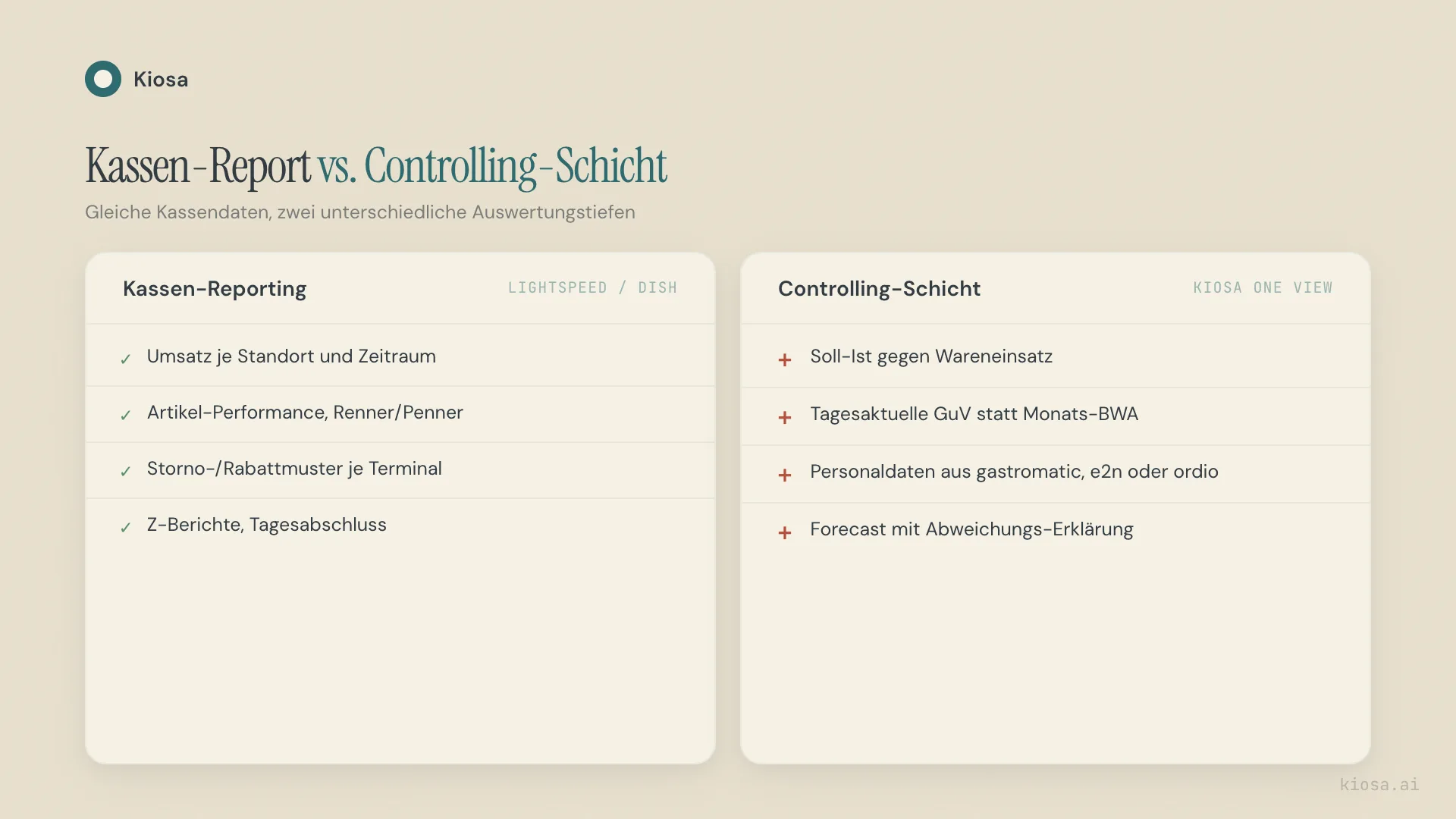
In practice, that means a POS report shows you that food cost for an item "looks" high when you compare sales figures with your own costing. It doesn't show you whether that's due to a higher supplier invoice, the wrong portion size in the kitchen or shrinkage. For that you need an actual vs. theoretical check against the food cost ratio — a calculation that links POS data with purchase prices rather than only comparing it with itself.
Is the POS report enough for a single restaurant?
Honestly: often, yes. If you run one location, work in the business yourself and have the numbers in your head, the built-in report is often enough. You see daily sales, average check, which items are selling — and can compare that with your own experience without needing a second piece of software. For a business without controlling ambitions, without several locations, without outside investors expecting a weekly report, an extra controlling layer would in many cases be overkill.
The calculation changes as soon as one of three factors comes in: more than one location, food cost that no longer feels right by gut, or someone outside daily operations — an investor, a co-owner or a bank — who wants reliable, comparable numbers. Then "I'll look at the till" is no longer enough, because the POS isn't built for exactly that comparison.
What does the controlling layer Kiosa adds on top actually do?
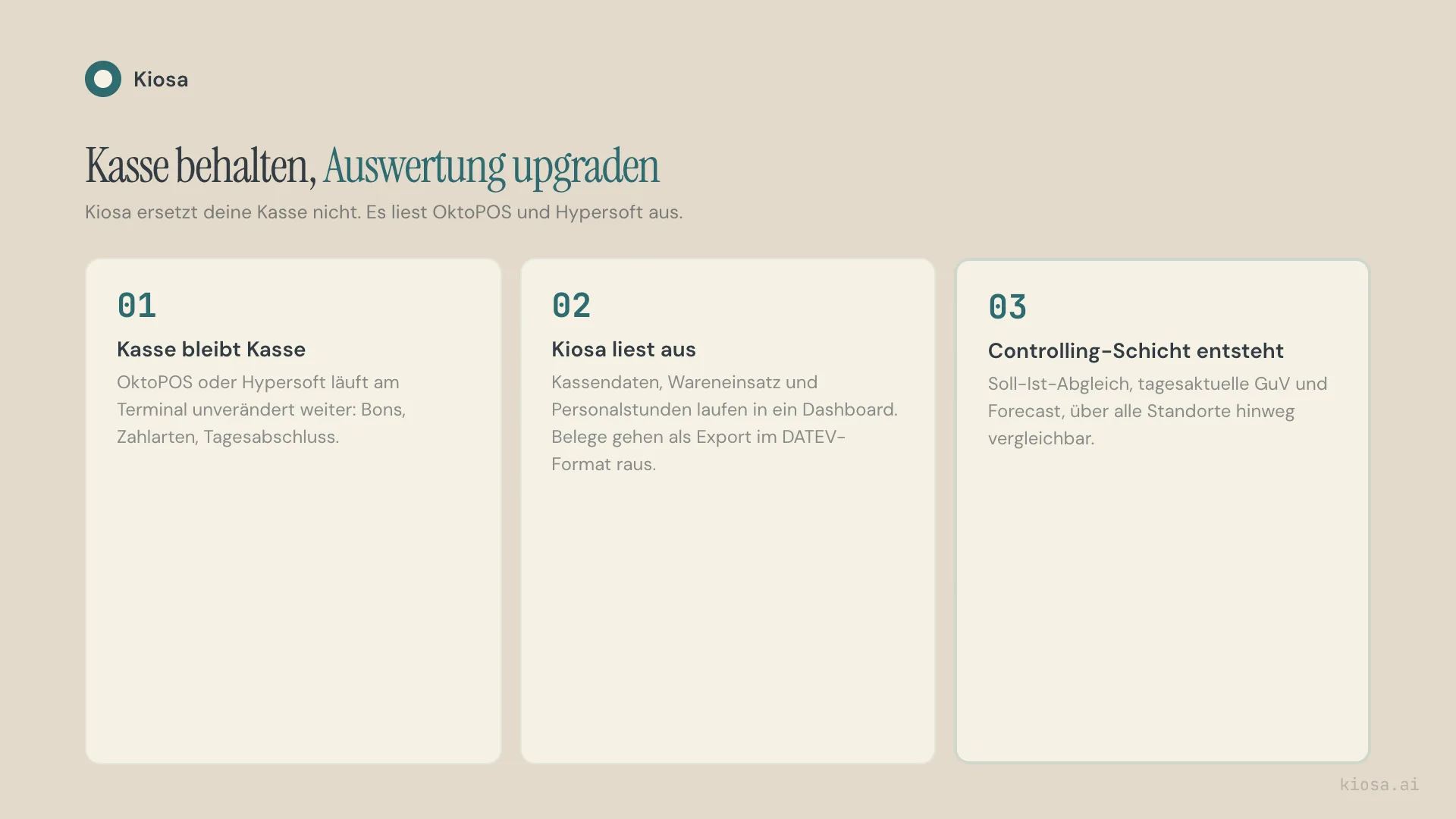
Kiosa doesn't replace the POS. It reads it through the interface and adds a controlling layer on top. The officially connected POS systems today are OktoPOS and Hypersoft, and on the staffing side gastromatic, e2n and ordio. Lightspeed and DISH are not among them. Three things happen that pure POS reporting structurally can't deliver, because it lacks the additional data sources:
- Actual vs. theoretical food cost. POS data is calculated against recipe costing and supplier prices, not just compared with itself. Variances show up as a number, not as a gut feeling.
- Same-day P&L instead of a monthly report. Sales, food cost and labor cost come together in One View per location and day. With the Invoices module, documents arrive in Kiosa by email, are pre-coded and exported for your accountant, instead of turning up in the books six weeks later.
- Forecast with variance explanation. The sales forecast is calculated per location. Public holidays, weather and local events feed into the forecast.
In Kiosa the framework for this is One View, €99 per location per month. If you want to run food cost control directly in Kiosa, add Inventory for €49, and Invoices including the export for €99. Fully built out with Scheduling and Loyalty, the total is €445 per location per month, with no setup fee. The add-on modules can be booked individually on top of One View; you pay for what you actually need, not a full-stack price from day one. Details on the pricing page.
What Kiosa is not
The honest part of this comparison: Kiosa isn't a POS system. You still need a POS for day-to-day operations at the terminal — for Kiosa, OktoPOS or Hypersoft — to print checks, process payments and send kitchen tickets. Kiosa takes on none of these tasks and doesn't want to. It sits one level above and reads what the POS already records.
For scheduling you have a choice: Kiosa has its own Scheduling module, and kiosk time tracking is already included in One View. If you'd rather stay with gastromatic, e2n or ordio, you connect those systems instead. Both work; neither option is mandatory. And on forecasting, the same applies: the forecast never replaces your own judgement when there are real outliers.
What's the most common mistake I see in multi-location businesses?
The most common mistake I see in multi-location businesses isn't missing reporting. It's the assumption that "more reporting on the same plan" automatically means it's comparable across locations. Seeing two locations in the same POS report is different from comparing them with the same definitions, the same periods and the same adjustment for public holidays or season. A POS report shows you two numbers side by side. Whether the numbers are really comparable depends on the definition behind them — and the POS doesn't supply that.
The second mistake follows directly: businesses pay for the most expensive plan because it says "multi-location", but don't really use the feature, because nobody has the time each day to cross-check several report views by hand. The tool is there. The process around it is missing.
From analysis to action
What this is about: recognising the limits of POS reporting and placing controlling on top of the POS.
Put it into practice: Kiosa One View as the controlling layer above the POS
More on Software selection and costs
- Restaurant POS Data Analysis: What Your POS Really Knows
- Restaurant Daily Report: What Belongs in It and Why
FAQ
What's the difference between POS reporting and controlling software?
POS reporting analyses the data generated in the POS system itself — sales, items, voids, usually for each location separately. Controlling software also calculates this data against food cost, labor cost and bookkeeping and makes it comparable across several locations. A POS report is a snapshot of the till; controlling is the comparison across systems and over time.
From which Lightspeed plan is multi-location reporting available?
According to the public (German) price page, reporting including analysis by location and the Pulse app are included in all three plans, so from Basic at €89/month. Lightspeed advertises "management of multiple locations" in its description of the Pro plan at €249/month (as of 10 November 2026).
Is Lightspeed or DISH POS reporting enough for a single restaurant?
In many cases, yes. If you run one location and are close to daily operations, the built-in reporting usually covers the key KPIs — sales, average check, item performance — well enough. An additional controlling layer only pays off once food cost, several locations or external reporting obligations come into play.
Does Kiosa replace my POS system?
No. Kiosa is a controlling dashboard that reads the data from your existing POS and calculates it against food cost, labor and invoices. The officially connected POS systems are OktoPOS and Hypersoft. If you use one of them, no switch is needed.
How accurate is the Kiosa forecast compared with a plain POS report?
Classic POS reporting doesn't provide a forecast; it shows past sales. The Kiosa forecast is calculated per location and takes historical POS data, weather, public holidays and local events into account. It doesn't replace human judgement when there are real outliers.
Your next steps
Before you upgrade your next POS plan or look for additional software, take two concrete steps:
- Check what your current POS plan really unlocks. With Lightspeed, it's worth looking at the line between Core and Pro before you upgrade for multi-location reporting you may already have in another tool.
- Work out where your food cost and labor cost currently land. With the P&L analyzer you can see in a few minutes how your cost structure compares with the industry — as a starting point before deciding whether a controlling layer on top of the POS is worth it.
If you want to know how Kiosa reads your POS and combines it with food cost, labor and invoices into a same-day dashboard, book a demo call — we'll look at your reporting together before you change anything.
Related terms
- Food cost ratio — food cost relative to sales, the basis for the actual vs. theoretical check
- Forecasting — predicting sales and guest numbers from historical POS data
Further reading
- Restaurant POS data analysis: what your POS really knows — which data fields are in every check and how to calculate them yourself
