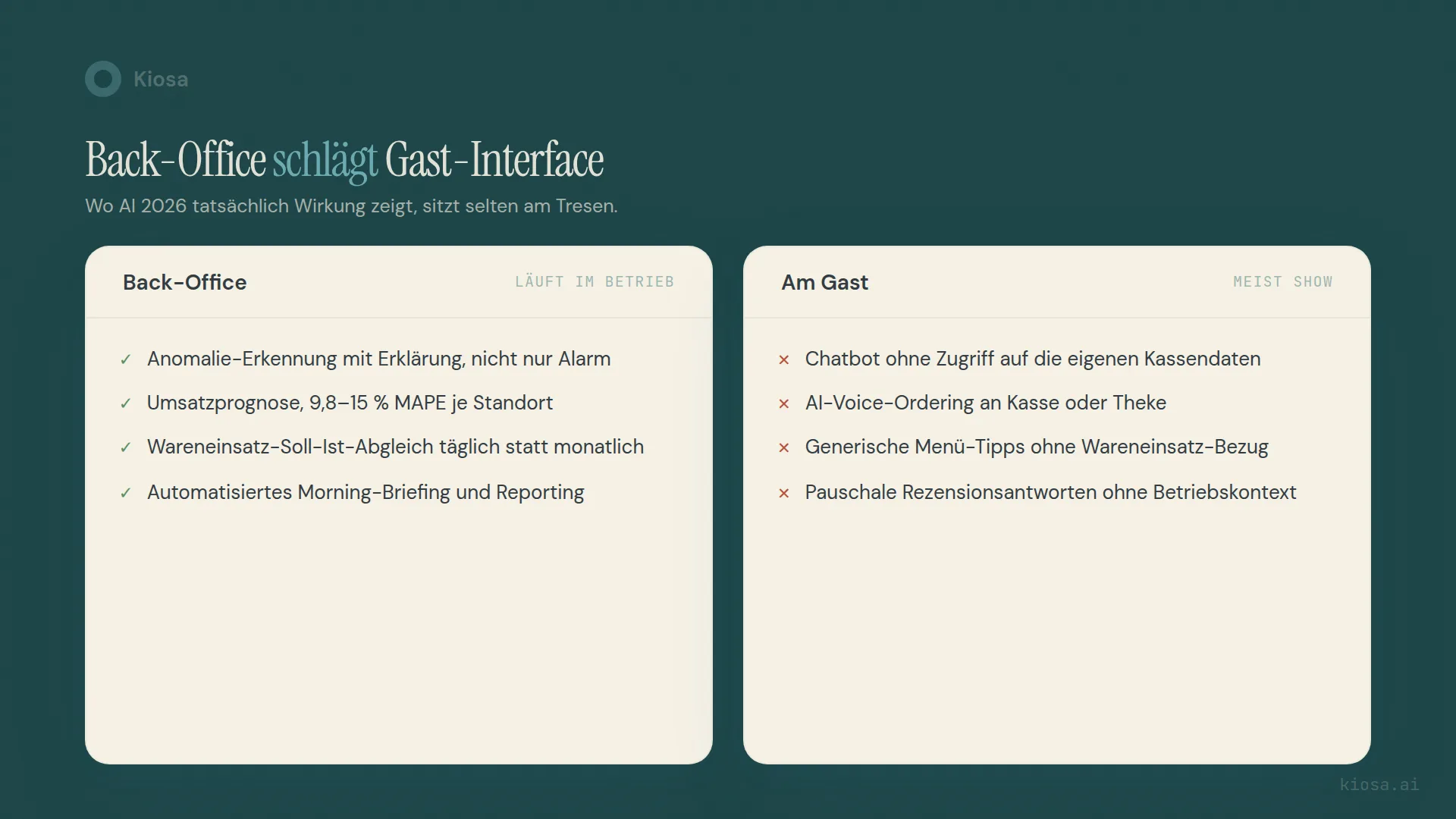
In 2026, AI in restaurants pays off mainly in the back office: anomaly detection, sales forecasting, food cost reconciliation, automated reporting. Guest-facing, with chatbots and voice ordering that have no access to your own numbers, the effect usually stays small. The hype is out front; the value is in the back. The yardstick is a fixed controlling routine with daily, weekly and monthly numbers: AI is worth it where it makes that routine faster or more accurate.
Table of contents
- What does AI controlling in restaurants actually mean?
- Where does AI really make a difference in operations today?
- Where is AI in restaurants overrated?
- Why does AI end up in the back office and not with the guest?
- What does AI controlling cost for your business?
- What does a realistic start look like?
- FAQ
- Your next steps
What does AI controlling in restaurants actually mean?
A year after AI featured in almost every hospitality trade show keynote, a sober review is worthwhile. Not: will AI revolutionise the industry. But: what concretely changed in a real business once the software was installed and left running for a year.
The answer is less spectacular than the conference slides promise. In practice, AI in restaurants means a system reads your POS data, your food cost and your labor planning, spots patterns and variances you'd otherwise only see at month-end, and writes an explanation. Not an autonomous agent that makes decisions. A tool that does the groundwork for your decision.
That's the core of AI controlling: deterministic KPIs (sales, food cost percentage, labor cost percentage) plus a language layer that explains why a number deviates from expectations. The numbers themselves don't come from the AI. They come from your POS, your labor planning, your bookkeeping. The AI puts into context what's already there.
Where does AI really make a difference in operations today?
Five use cases have proven robust in the back office. All five have one thing in common: they need access to your own operating data, not to a generic language model.
Anomaly detection. A z-score-based model flags when a KPI falls statistically out of line — for example a labor cost percentage that's suddenly two percentage points above normal on a Tuesday. The AI layer then writes a plain-language explanation instead of a raw alert. The difference from classic threshold alarms: the system learns your business's individual rhythm, not a blanket limit.
Sales forecasting. A forecast combining history, weather and public holidays won't impress on stage, but it's accurate enough to base staffing and orders on. Local events feed in too, so the forecast doesn't miss on those days. How this flows into scheduling is covered in the article on labor scheduling by sales.
Actual vs. theoretical food cost. Combining recipe costing, purchase prices and POS sales shows at every stock count whether your actual food cost matches what should have been used according to the recipes. Variances that used to show up only in the monthly P&L become visible with the next count. If you want to check where your own margin stands right now, you can do it in a few minutes with the food cost calculator.
Automated reporting. A morning briefing that summarises the relevant variances from the previous day every morning replaces copying and pasting from three systems into Excel. Most of the underlying data fields are already in your POS. The article on restaurant POS data analysis shows exactly which fields those are.
Invoice and document capture. Incoming supplier invoices are captured automatically, pre-coded, exported for your accountant and linked to food cost. That doesn't replace an accountant, but it saves the manual typing that still happens in most businesses.
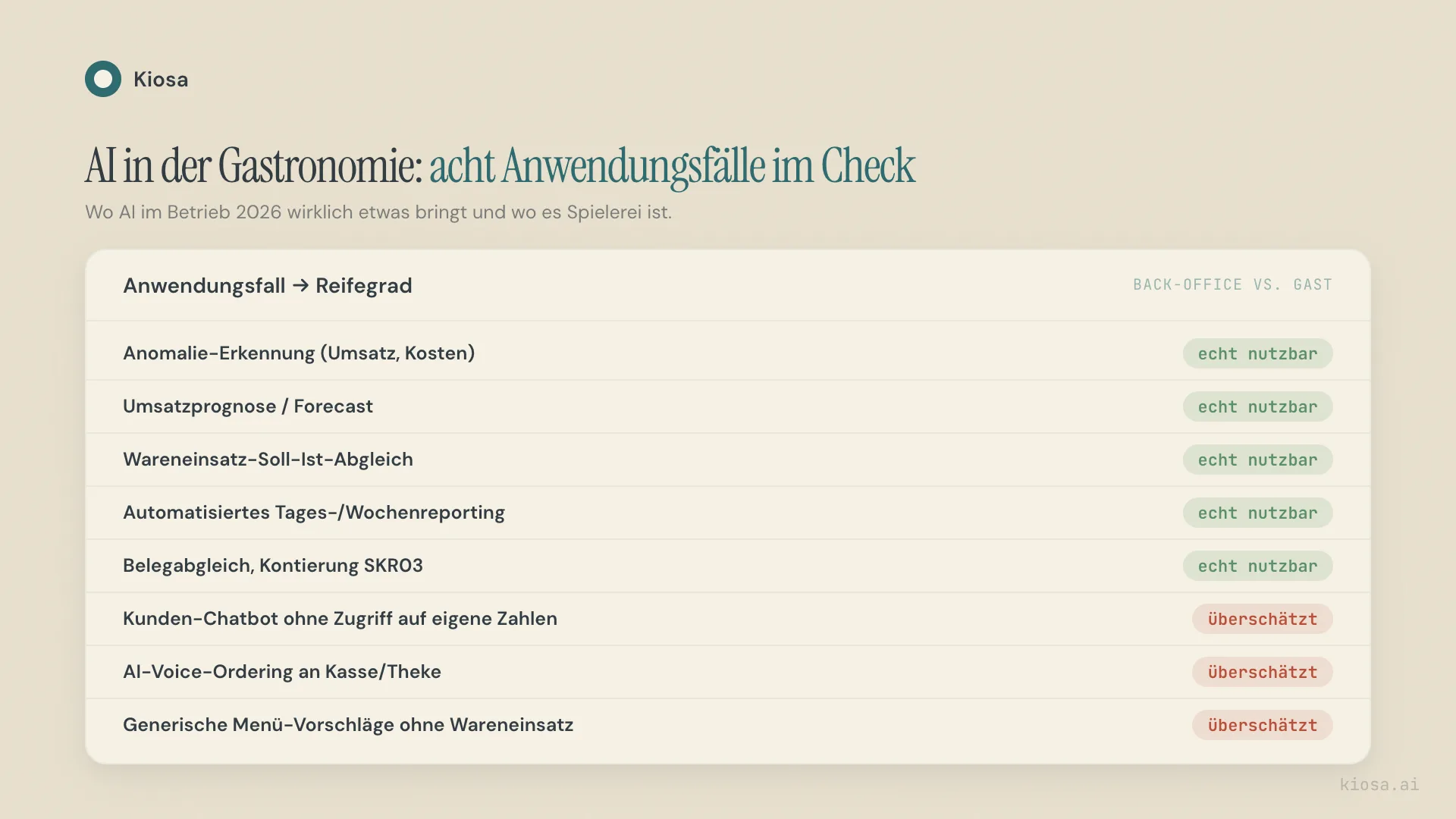
The overview shows the pattern: everything that's genuinely usable sits in the back office and works with numbers the business generates itself.
| AI use case | Benefit | Maturity |
|---|---|---|
| Anomaly detection (sales, costs) | Variances explained the same day instead of discovered at month-end | Genuinely usable |
| Sales forecasting | Plan staffing and orders on expected rather than past sales | Genuinely usable |
| Actual vs. theoretical food cost | Shrinkage and costing errors visible in days instead of weeks | Genuinely usable |
| Automated daily/weekly reporting | No more manual copying from three systems | Genuinely usable |
| Invoice/document capture (accounting export) | Less typing, a clean basis for bookkeeping | Genuinely usable |
| Customer chatbot without access to your own numbers | Answers standard questions, but knows neither tables nor stock | Overrated |
| AI voice ordering at the till/counter | Works for simple orders, fails with variations and noise | Overrated |
| Generic menu suggestions without food cost data | Sounds original, ignores contribution margin and stock | Overrated |
Where is AI in restaurants overrated?
The counter-check is just as instructive. A chatbot that answers questions on the restaurant website but has no access to your real numbers — not table occupancy, not today's menu, not food cost — remains a nice toy. It can repeat opening hours. It can't tell you whether the salmon is still available today.
AI voice ordering at the till is the most prominent example of the gap between announcement and everyday reality. In 2024, after around three years of collaboration, McDonald's ended its drive-thru voice assistant test with IBM (Restaurant Dive, McDonald's ends IBM drive-thru voice order test, accessed 24 August 2026). Since 2025, Taco Bell has been rethinking where it uses its voice AI at more than 500 drive-thrus after viral order mistakes went public; at high-traffic locations, humans are more likely to take orders again (TechCrunch, Taco Bell is having second thoughts about relying on AI at the drive-through, accessed 24 August 2026). That's not a niche problem but a structural one: voice AI works well in quiet, standardised scenarios and badly in the loud, variation-rich reality of a restaurant at peak time.
Automated menu suggestions generated by a generic AI without access to your food cost also sound original while ignoring the only number that counts: contribution margin. A suggestion that sounds good but doesn't know your stock levels is entertainment, not controlling.
The common root of all three overrated cases: they run with the guest, without real access to the business's own data. Exactly where visibility is greatest but context is missing.
Why does AI end up in the back office and not with the guest?
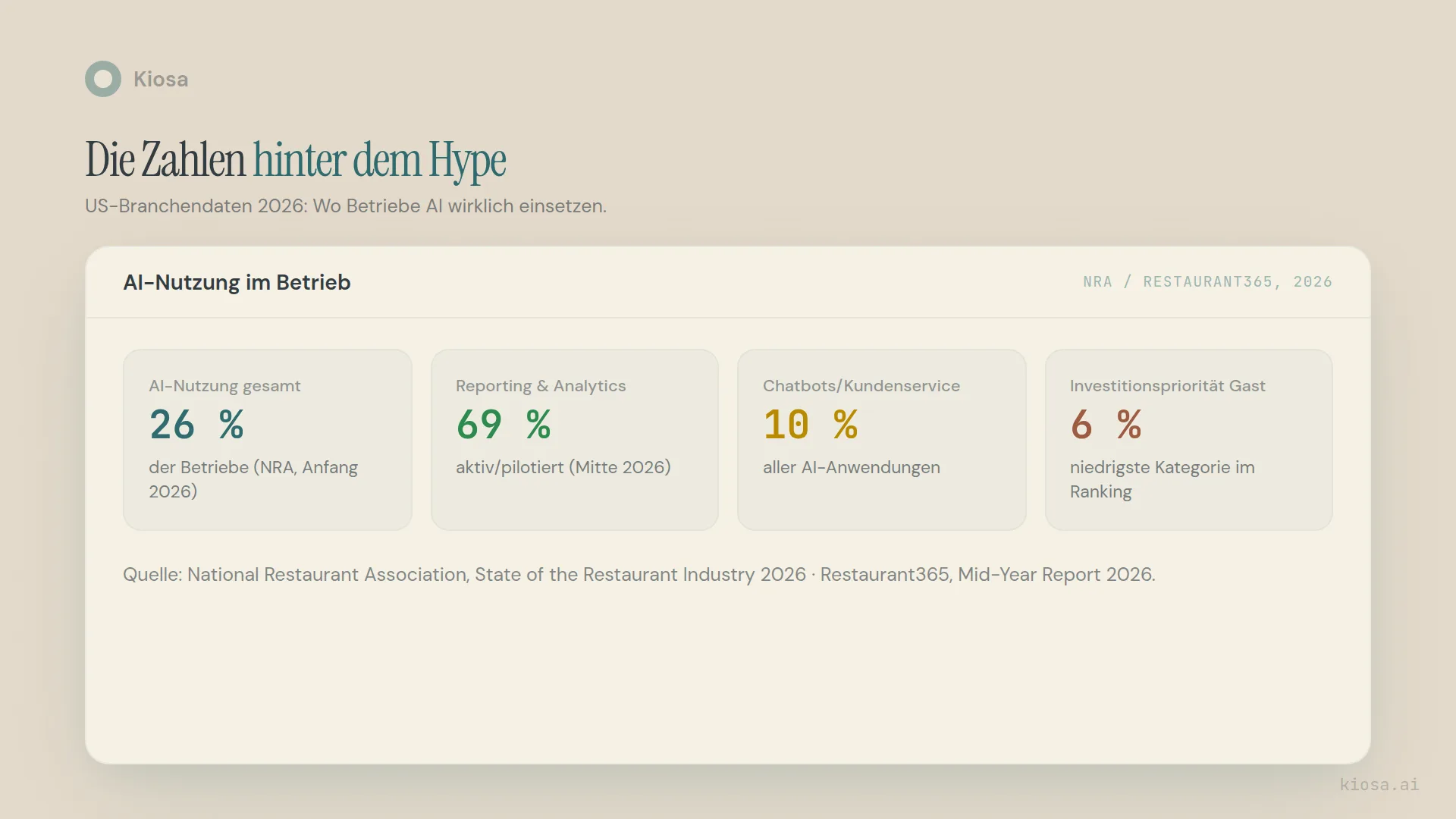
That's not a Kiosa opinion, it's what the available industry data shows. In its State of the Restaurant Industry report in early 2026, the National Restaurant Association found that 26 percent of operators surveyed use AI tools (National Restaurant Association, State of the Restaurant Industry 2026, accessed 24 August 2026). Only 6 percent of them for customer ordering.
Restaurant365's mid-year report paints an even clearer picture: reporting and analytics are actively used or piloted by 69 percent of operators, a jump from around 25 percent at the start of the year. Chatbots and customer service, by contrast, account for just over 10 percent of AI applications, and front-of-house AI is the lowest investment priority for the second half of the year at just over 6 percent (Restaurant365, 2026 State of the Restaurant Industry Mid-Year Report, accessed 10 November 2026). Among active AI users, 62 percent report lower labor costs.
The numbers follow from the industry's cost structure. Labor and food cost are the largest cost blocks for most restaurants — and those are exactly where anomaly detection, forecasting, food cost reconciliation and reporting come in. A chatbot doesn't lower your labor cost percentage. A clean forecast does, because it prevents too many hours from being scheduled on quiet days. How that works in detail is covered in the article on restaurant financial controlling.
It's also interesting how differently studies can be read: an international Deloitte survey of 375 executives in eleven countries shows higher reported daily use of guest chatbots, at 60 percent, against 55 percent for inventory management (Deloitte, How AI is revolutionizing restaurants, accessed 24 August 2026). That's a pure adoption figure, not a measure of impact. It says where businesses have tried something, not where it actually saves money. That difference between trying and impact is the core of this article.
If you're already seeing sales decline and want to know whether an anomaly or a structural cause is behind it, the article on why restaurant sales are dropping provides the systematic diagnosis.
What does AI controlling cost for your business?
Kiosa sells AI controlling in modules, per location per month, with no setup fee:
| Module | Price per location/month |
|---|---|
| One View (KPI dashboard, AI briefing) | €99 |
| Inventory (food cost reconciliation) | €49 |
| Invoices (document workflow, accounting export) | €99 |
| Loyalty (guest retention) | €99 |
| Scheduling (AI scheduling, shift planning) | €99 |
| Fully built out, all five modules | €445 |
No location needs all five modules from day one. The three most directly tied to the largest cost blocks — One View, Inventory and Invoices — already cover anomaly detection, forecasting, food cost reconciliation and document processing. The Scheduling module is live too, and if you already work with gastromatic, e2n or ordio, you can connect those systems instead. Both are possible; neither is mandatory. All prices are on the pricing page.
For comparison, a worked example with an entirely made-up model business, "Trattoria Nordlicht", with €800,000 in annual sales, shows the order of magnitude. At an assumed labor cost percentage of 40 percent, that's €320,000 in labor cost. Improving the labor cost percentage by a single percentage point through better scheduling would be worth €8,000 a year for this model business — considerably more than the €1,776 annual cost of One View plus Inventory (€148 a month). That's a model calculation, not a promise. How much your own percentage changes depends on your starting point.
What does a realistic start look like?
The most common mistake I see in businesses introducing AI controlling: they want everything at once — forecasting, food cost, reporting, scheduling — and then get lost in data preparation before they see the first benefit.
A more realistic path starts with a single question: where does it hurt most right now — labor cost, food cost or a lack of overview across several locations? That one answer determines which module comes first. One View on its own delivers a daily picture without changing anything about how the business runs. The connection runs through existing systems; Kiosa doesn't replace the POS, it reads it.
Inventory typically follows once actual vs. theoretical food cost becomes the next visible pain point. Scheduling and Invoices often come last in practice, because they intervene most in existing processes and need correspondingly more preparation.
If you want to point AI directly at your own operating numbers, the article Claude AI for restaurants shows what an assistant can do with and without a connection. What the CSV route looks like and where it hits its limits is described in analysing restaurant POS data with ChatGPT.
From analysis to action
What this is about: a sober view of what AI delivers in restaurants: back office rather than guest-facing applications.
Put it into practice:
More on Controlling and finance
- Restaurant Financial Controlling: What to Measure Daily, Weekly and Monthly
- Claude AI for Restaurants: Analyse Your Numbers, 10 Questions
- Analyze Restaurant POS Data with ChatGPT: CSV vs. Plugin
FAQ
Does AI replace the controller in a restaurant business? No, not in the sense that nobody makes decisions any more. AI takes over the data work: merging, calculating and explaining variances. Deciding what follows from that is still up to a human. For smaller businesses, it usually removes the need to hire a controller at all.
How accurate is AI forecasting in restaurants really? That depends on location size, data history and how volatile the business is. I consider values below 5 percent per location unrealistic in an industry affected by weather, events and public holidays.
Do I need a chatbot for my restaurant? Only if it has real access to your numbers, such as current availability or reservation status. A chatbot that only repeats opening hours can be replaced by a simple FAQ page.
What does AI controlling cost for a restaurant? At Kiosa, modular from €99 per location per month for the base dashboard, and €445 fully built out with all five modules. No setup fee, no hidden costs.
How quickly do you see results from AI controlling? Anomaly detection and daily reporting deliver results from the first day after connection. Improvements in labor cost or food cost percentage take longer, because they depend on changed behaviour in the business, not just on the software itself.
Your next steps
The sober finding after 12 months: AI in restaurants works best where it works with your own numbers, not where it's most visible. Before you invest in a module, it's worth looking at your own cost structure — the P&L analyzer shows you in a few minutes how it compares with the industry.
If you want to know where exactly Kiosa would make a difference in your business, book a demo call and we'll look at your numbers together.
