ChatGPT, Perplexity and Google AI Overviews recommend restaurants based on five signals: a complete Google Business Profile, reviews with fast replies, recent photos, consistent contact details and structured website data. AI replaces the list of links with a direct answer — and that answer has room for two or three names. Not ten.
Until now, a reasonably maintained Google profile was enough for a spot in the Local Pack. Since AI systems started making direct recommendations, the rules have become tougher. This guide shows you the five factors that decide whether AI assistants recommend your restaurant. Plus a 15-point checklist you can work through in one afternoon. The recommendations are based on hands-on experience from running restaurants (Mama Trattoria, Hamburg, which belongs to Kiosa's founding family).
Table of contents
- Why your Google profile now counts twice
- The 5 factors AI assistants use to judge restaurants
- The 15-point checklist
- What Kiosa does with your reviews
- FAQ
- Your next steps
Why your Google profile now counts twice
46 percent of all Google searches have local intent (source: Google, Secrets of Local Search). For restaurants the share is considerably higher. The question "good Italian restaurant with a terrace near me" used to be answered with ten blue links. Now an AI assistant answers it with a specific name and a reason.
Google names three factors for local ranking: relevance, distance and prominence (Google Help). According to BrightLocal's study on local ranking factors, Google Business Profile signals contribute 32 percent of Local Pack ranking, and review signals another 16 percent (BrightLocal, Local Search Ranking Factors). Together, almost half. And that only covers classic search.
AI recommendations are more selective. An AI assistant doesn't name ten options, but two or three. To make that shortlist, your profile has to deliver more than the basics. AI systems cross-check your data across several independent sources: Google profile, review sites, your own website, business directories. What is consistent gets a high trust score. What is contradictory or missing drops out.
That applies to a single restaurant just as much as to a group with 20 locations. The difference: in a group, every mistake multiplies. A wrong phone number on a directory site doesn't cost one location its visibility, but potentially all of them.
In practical terms: your Google Business Profile used to be a hygiene factor. Set it up, forget it, done. Now it's a competitive factor. If you actively maintain your profile, you have an advantage over the large majority of restaurants that don't. And that advantage grows as more guests hand their restaurant search over to AI assistants.
The 5 factors AI assistants use to judge restaurants
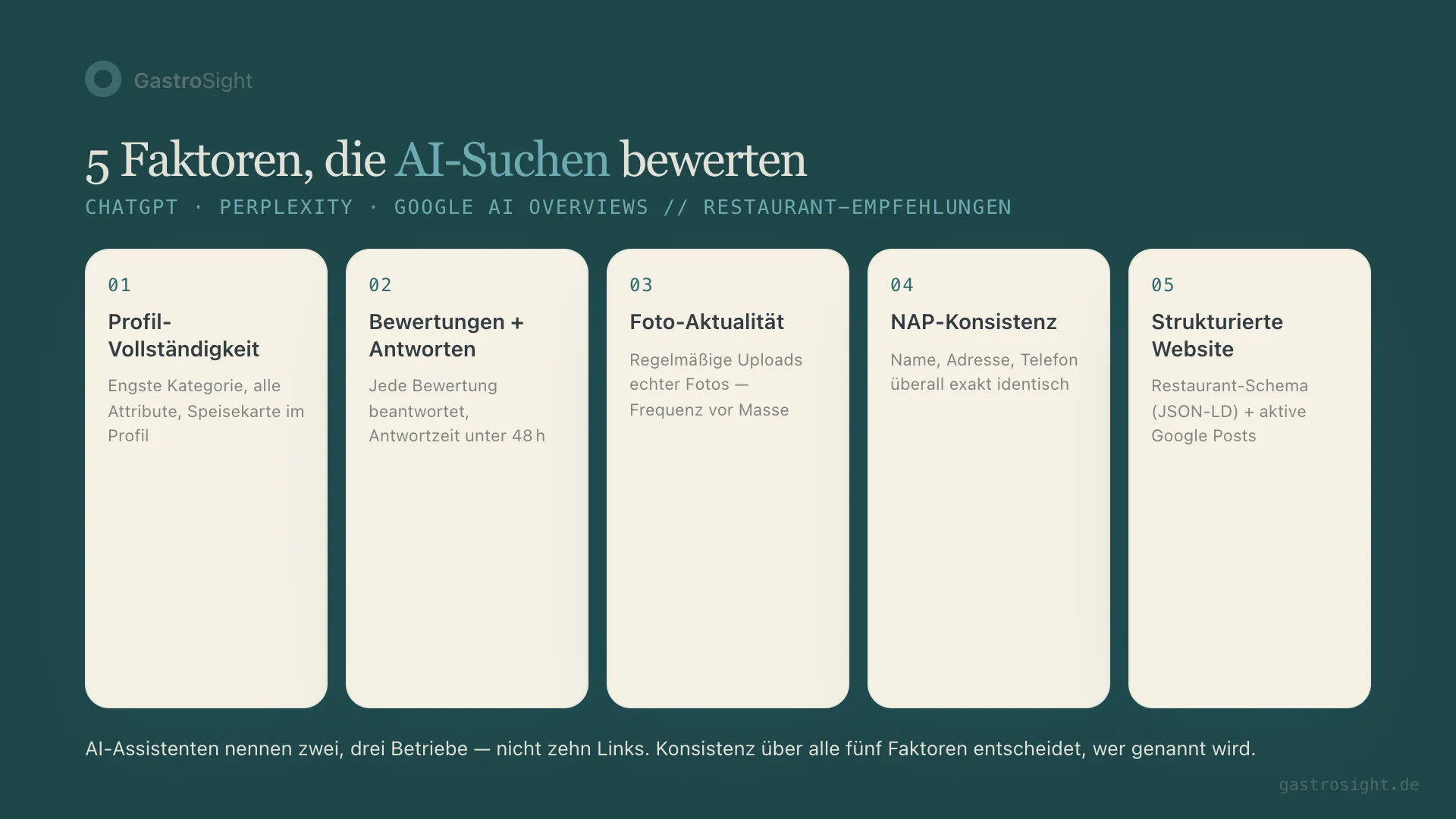
1. Profile completeness
The primary category is the strongest single factor in local ranking. "Pizza restaurant" beats "Restaurant", "Sushi bar" beats "Asian restaurant". Google has several thousand categories. Pick the narrowest one that fits.
Every attribute you set in the profile (outdoor seating, Wi-Fi, vegan options, delivery, wheelchair access, parking) is a filter that searchers and AI systems use. Every missing attribute is a missed match. If someone searches for "restaurant with outdoor seating and Wi-Fi" and you have both but haven't entered either, you don't exist for that search.
This also includes: a menu directly in the profile (Google's menu editor or a link), a description containing the terms you want to be found for, and correct opening hours including public holidays and special hours. Google's official help says, in essence, that businesses with complete and accurate information are easier to match with the right searches.
A concrete example: if a guest asks ChatGPT "Where in Hamburg-Eimsbüttel can I sit outside and order gluten-free pizza?", the AI assistant needs three things: the location (an address in Eimsbüttel), the "outdoor seating" attribute and a menu that lists gluten-free options. If even one of them is missing, your restaurant doesn't show up. Even if it offers exactly that.
2. Reviews and reply behaviour
Profiles with 50 or more reviews get 4.4 times more clicks than profiles with fewer than five. From 100 reviews, businesses record on average 31 percent more leads year on year (both: BrightLocal, Local SEO Statistics). But the raw number is only the start.
89 percent of consumers read businesses' replies to reviews. 56 percent say a thoughtful reply to a negative review improves their perception of the business (BrightLocal, Consumer Review Survey 2024). And 81 percent expect a reply within a week, 32 percent by the next day (BrightLocal, Consumer Review Survey 2026).
For AI systems, reply behaviour is an activity signal. A profile where every review has a personal reply looks different to the algorithm from a profile with 200 reviews and zero replies. The second one looks abandoned.
To respond well and fast, use the templates in our guide on how to respond to Google reviews as a restaurant.
3. Photo freshness
Google favours profiles with regular new photos. Its official help says that regularly adding photos to your Business Profile can increase customer interest (Google Help). AI systems use photo metadata and upload frequency as a freshness signal. A profile whose last photo was uploaded eight months ago looks to an algorithm like a business that may have closed.
Practical tip: one photo a week is enough. Dishes on real plates, the real dining room, the real team. No stock photos. Seasonal updates (the terrace in summer, Christmas decorations in December) show the algorithm and the guest: something is happening here.
4. NAP consistency
NAP stands for name, address, phone — the three core details that must be identical everywhere. AI systems check whether these details match across your Google profile, your own website, delivery platforms, business directories and social media. A different spelling of the address ("Street" vs. "St.") or an old phone number on a directory site is enough to lower the trust score.
That sounds like a detail. In practice it's one of the most common mistakes. Especially for businesses that have moved, changed their phone number or are listed under different brand names on different platforms. Fixing it is one-off work that pays off permanently. Tip: Google your restaurant's name and look at the first three pages of results. Every listing with different details is a trust minus. Correct them directly or use each platform's reporting function.
5. Structured website basics
AI systems read structured data on your website. A Restaurant schema (Schema.org) tells a crawler in machine-readable form what your restaurant offers: opening hours, address, cuisine, price range. Without schema, the algorithm has to guess. With schema, it gets facts.
Google Posts count too — the short updates in your Business Profile. One post a week (daily special, event, seasonal menu) signals activity. Posts expire after seven days. If you don't write new ones, you disappear from that channel. Most restaurants don't use Google Posts at all. Those that do stand out positively to the algorithm.
These five factors don't stand alone. A profile with great photos but zero review replies looks inconsistent. So does a profile with 500 reviews but an outdated menu. AI systems judge the overall picture. If you're strong in one factor and weak in another, you'll often lose to a competitor who is solid across the board.
The good news: your competitors are mostly asleep. In 2026, 41 percent of consumers "always" read reviews before visiting a business — up from 29 percent the year before (BrightLocal 2026). But most restaurants don't reply. The average reply rate for independent restaurants is just 15 percent (RightResponse AI). If you reply to every review, you're immediately in the small leading group.
The 15-point checklist
Print the list, pin it up in the office and work through it in a quiet hour. Most points cost no money. Only attention. We go through our own profiles with this list once a quarter. The first time takes 60 to 90 minutes per location. After that, 15 minutes, because only details change.
Profile completeness
1. Choose the most specific primary category possible. "Pizza restaurant" instead of "Restaurant". "Café" instead of "Bakery". The primary category determines which searches your profile is even considered for.
2. Set all relevant attributes. Outdoor seating, Wi-Fi, wheelchair access, delivery, vegan options, reservations, parking. Every attribute you don't set is a filter you lose.
3. Keep opening hours up to date. Including public holidays, closures and special hours. Wrong opening hours are the fastest route to a 1-star review.
4. Add your menu to the profile. Via Google's menu editor or as a link to the current menu. AI systems use menu data to answer questions like "restaurant with vegan pasta under €15". Without a menu in your profile, you're invisible for such queries.
Reviews and reply behaviour
5. Reply to every review. Positive and negative. Short, personal, referring to what the review actually says. "Thanks for your feedback" without reference to what was said doesn't count.
6. Keep reply time under 48 hours. 32 percent of guests expect a reply by the next day. If you take three weeks, you've missed the chance to make a positive impression.
7. With criticism: de-escalate, offer a solution, never argue. Public escalation always hurts. Even if the guest is wrong. Offer to resolve the issue personally. 56 percent of consumers rate a business more highly if it responds professionally to criticism (BrightLocal 2024).
8. Actively ask for reviews. A QR code on the table, a note on the bill, a short message after the booking. 50 reviews is the threshold from which Google takes your profile seriously. Building up takes time, but pays off disproportionately.
Photo freshness
9. Upload at least one new photo a week. Not everything at once. Upload frequency counts for more than volume. A profile whose last photo is months old looks inactive to guests.
10. Real photos instead of stock material. What you see when you walk through your door: that's exactly what your guests want to see beforehand. They spot generic stock photos immediately. So do AI systems.
11. Seasonal updates. Terrace photos in summer, Christmas decorations in December, the new seasonal menu in spring. It shows the algorithm and the guest: something is happening here.
NAP consistency
12. Keep name, address and phone number identical everywhere. Google profile, your own website, delivery platforms (such as Lieferando or Wolt), directories (Yelp, TripAdvisor), social media. Exactly the same spelling. No abbreviations in one place and full words in another.
13. Clean up old listings. Search for your restaurant on Google, Yelp, TripAdvisor and the delivery platforms you're on. If an old address or phone number appears, correct it. Every inconsistency costs you visibility in local search.
Structured website basics
14. Implement schema markup on your website. A Restaurant schema (JSON-LD) with opening hours, address, cuisine and price range. Most website builders offer this as a plugin or setting. If you have your own site, it takes 15 lines of code in the header.
15. Use Google Posts. One post a week is enough. Daily special, event, new menu, seasonal dishes. Posts expire after seven days. If you don't write new ones, you disappear from this channel completely.
What Kiosa does with your reviews
Points 5 to 8 of the checklist are the biggest lever — and the most time-consuming. Checking three or four platforms for new reviews every day, writing personal replies, keeping up the pace: across several locations that quickly eats two hours a day.
Kiosa One View collects reviews from Google, TripAdvisor, Lieferando and other platforms in one place. New reviews appear in a feed, sorted by urgency. For standard cases (4- and 5-star reviews without specific criticism), the AI suggests a reply that you approve with one click or edit. Critical reviews are flagged and wait for your personal reply.
You hit the 48-hour reply time across all platforms without opening five tabs every morning. And you keep control over every word that goes out: the AI recommends, you approve.
If you have your restaurant KPIs under control, take the review side just as seriously. Reviews are the public version of your operating numbers. Both show outsiders how your business is doing. The difference: only your accountant sees your sales figures. Your reviews are seen by everyone looking for a restaurant in your city.
Monitoring three platforms in parallel is a must. Five would be better. Nobody manages that by hand for long once they run three locations. Not because the work is hard, but because it comes up every day and is the first thing to slip in the rush of daily operations. That's exactly what tools are for.
Everything on Guests and online visibility
Related on kiosa.ai:
From analysis to action
What this is about: local discoverability and reliable profile signals for restaurants.
Put it into practice: Kiosa Loyalty for guest retention and feedback
FAQ
How do I find out whether ChatGPT recommends my restaurant?
Ask ChatGPT directly: "Which Italian restaurant with a terrace do you recommend in [your city]?" Test different phrasings, cuisines and occasions. Try Perplexity and Google AI Overviews too (via Google Search, if AI Overviews are available to you). If your restaurant doesn't show up in any of the three, your signals are too weak. Work through the checklist above and test again after four to six weeks.
Do I have to pay for a Google Business Profile?
No. The profile is completely free. Google Ads (paid local ads) is a separate product. You achieve organic visibility through your Business Profile without an ad budget. All you have to invest is time.
How quickly do the optimisations work?
It varies by measure. Category and attributes take effect within a few days. Building up reviews takes weeks to months. Persistence counts here: if you collect 10 new reviews every month, you'll have 60 more after six months and cross the critical threshold of 50. NAP corrections in external directories can take two to eight weeks before Google picks them up. Photo uploads affect the freshness signal immediately, but the cumulative effect of regular uploads builds over weeks. Expect three months before all the measures together show a measurable change.
Do I need my own website, or is the Google profile enough?
The Google profile alone is enough for basic visibility in local search. For a strong position in AI recommendations, you also need a website with structured data (schema markup). AI systems compare profile and website. If you have both and keep the data consistent, you win the trust score over businesses that only have a profile. A simple website with menu, opening hours, address and an embedded Restaurant schema is enough as a minimum. It doesn't have to be elaborate.
Can AI software take over profile maintenance completely?
Partly. Tools like Kiosa take over review monitoring and speed up reply times across all platforms. The profile optimisation itself (category, attributes, photos, Google Posts) you do directly in Google. Just as AI in controlling spares you the analyst, here it spares you the daily review round across five platforms.
Your next steps
- Work through the checklist. The 15 points are done in an afternoon. Print them out and pin them up in the office.
- Measure your review pace. How long does it currently take you to reply to a new review? If it's more than 48 hours, that's your most urgent lever.
- Run the AI test. Ask ChatGPT and Perplexity for restaurants in your city and your cuisine. Does your restaurant show up? If not, you now know why.
- Try Kiosa One View. All reviews in one place, AI reply suggestions, reply-time tracking. Book a 30-minute demo — we'll show you what it looks like for your business.
