Capturing invoices digitally means matching the delivery note or order against the incoming invoice automatically, line by line, not just the total. This plan vs. actual match reliably reveals three kinds of error: wrong unit prices, silent price increases without notice, and invoices submitted twice. Done by hand, the check takes hours every week. Automated, it runs alongside goods receiving, before an invoice is even approved for payment. Only checked invoices make your food cost and P&L reliable, exactly the numbers that sit on the table every week and month in restaurant financial controlling.
AI can do this match in seconds instead of hours. But the process behind it isn't new, and you don't need software to understand it. You only need a picture of which three documents belong together, and what happens when none of them gets checked.
Contents
- What digital invoice capture in a restaurant actually means
- Two-way or three-way match: what you really check the invoice against
- Which errors the match reliably uncovers
- How the digital invoice workflow runs in practice
- Worked example: a silent price increase in the match
- How to set up the match, with and without software
- What changes when invoices are coded and export-ready straight away
- Is this the same as e-invoicing?
- FAQ
- Your next steps
What digital invoice capture in a restaurant actually means
Most restaurants have had digital invoices for a long time. The supplier sends a PDF instead of a paper slip, and the bookkeeper scans in the rest. That's digitisation in the narrowest sense: a document exists as a file instead of paper.
That's not the same as digital invoice capture in the sense of this article. A scanned invoice that nobody checks against anything is just a digital slip of paper. The value only appears when the numbers on the invoice are automatically compared with two other numbers: what was ordered, and what was actually delivered.
The most common mistake I see in multi-location businesses is exactly this gap. Invoices are captured, coded, posted, and nobody has ever held them against the delivery note. Not out of carelessness, but because there's no time. With three to five suppliers and daily deliveries, 30 to 50 invoice lines a week add up easily. If you want to check that by hand, you check either thoroughly or quickly. Both at once is hardly possible.
So digital invoice capture means: capturing is only the first step. The match is where the investment pays off.
Two-way or three-way match: what you really check the invoice against
Invoice checking has two established variants for controlling an incoming invoice. Both come from classic procurement and transfer one-to-one to restaurants.
Two-way match: the invoice is checked against the order. Do quantity and price match what was ordered? That's enough if you're sure that what was ordered was delivered. For services or subscription invoices it's often the only sensible match.
Three-way match: goods receiving is added, meaning the delivery note, or better, what was actually booked in at goods receiving. The invoice is checked not only against the order, but also against what really arrived. Only this third point catches the cases where ordered and invoiced agree, but something else was delivered: too small a quantity, a different pack size, an item that's on the invoice but was never unloaded.
For restaurants, the three-way match is the standard you need. Inventory in a restaurant means daily, often multiple deliveries of fresh produce, where quantities and pack sizes change all the time. A pure two-way match would miss exactly the errors that occur most often in practice: differences between what's on the delivery note and what ends up being invoiced.
Which errors the match reliably uncovers
Three error patterns come up again and again in practice. All three are inconspicuous on their own; they only show up when one line is compared with another.
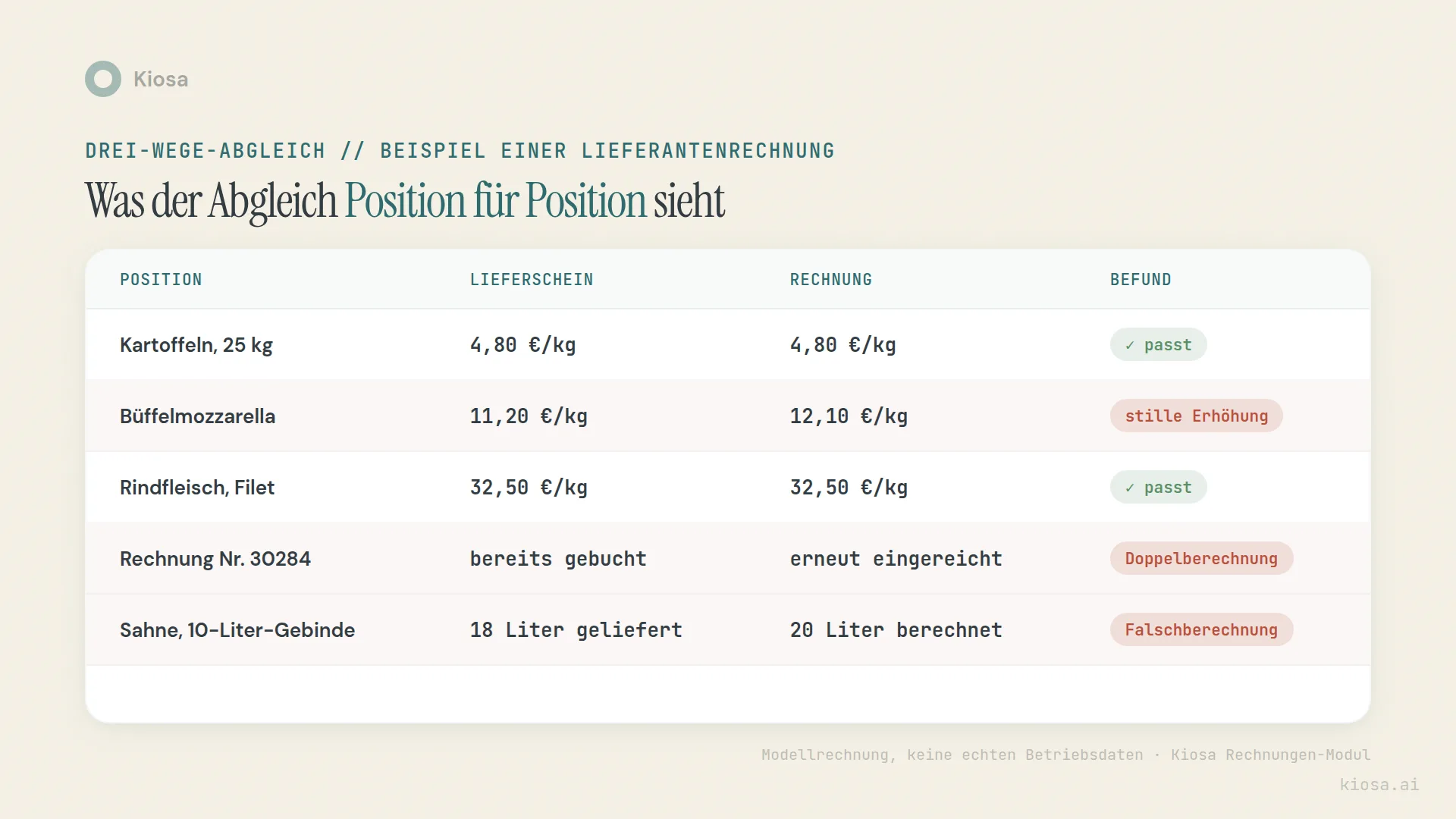
Wrong charges. The delivery note shows 18 litres, the invoice charges 20. Transposed digits, a value copied wrongly from the ordering system, a typo in the supplier's billing: the causes are usually trivial, but the effect is still real money. On a single document it looks like small change. Over a year and several suppliers it becomes an amount that stands out as soon as someone does the maths.
Silent price increases. The price per kilo rises step by step, without notice, often spread over several months. A rise of a few cents on its own goes unnoticed. In total it shifts your food cost percentage without anyone ever having queried a specific invoice. How to compare supplier prices over time and spot pricing tricks systematically is covered in detail in restaurant supplier price increases. This article is about the other part of the problem: not the price trend over months, but the single invoice that already doesn't match the delivery note at goods receiving.
Duplicate charges. An invoice arrives twice: once by email, once as the original by post, or a supplier accidentally includes the same line in two collective invoices. Without an automatic match against document numbers already posted, this only shows up when the month-end total doesn't fit the expected food cost, if it shows up at all.
All three error patterns have one thing in common: they're almost invisible at the level of the single invoice. Only the automatic match against order and goods receiving makes them visible, and before the invoice is paid, not once the money has already been transferred and you have to claim it back.
How the digital invoice workflow runs in practice
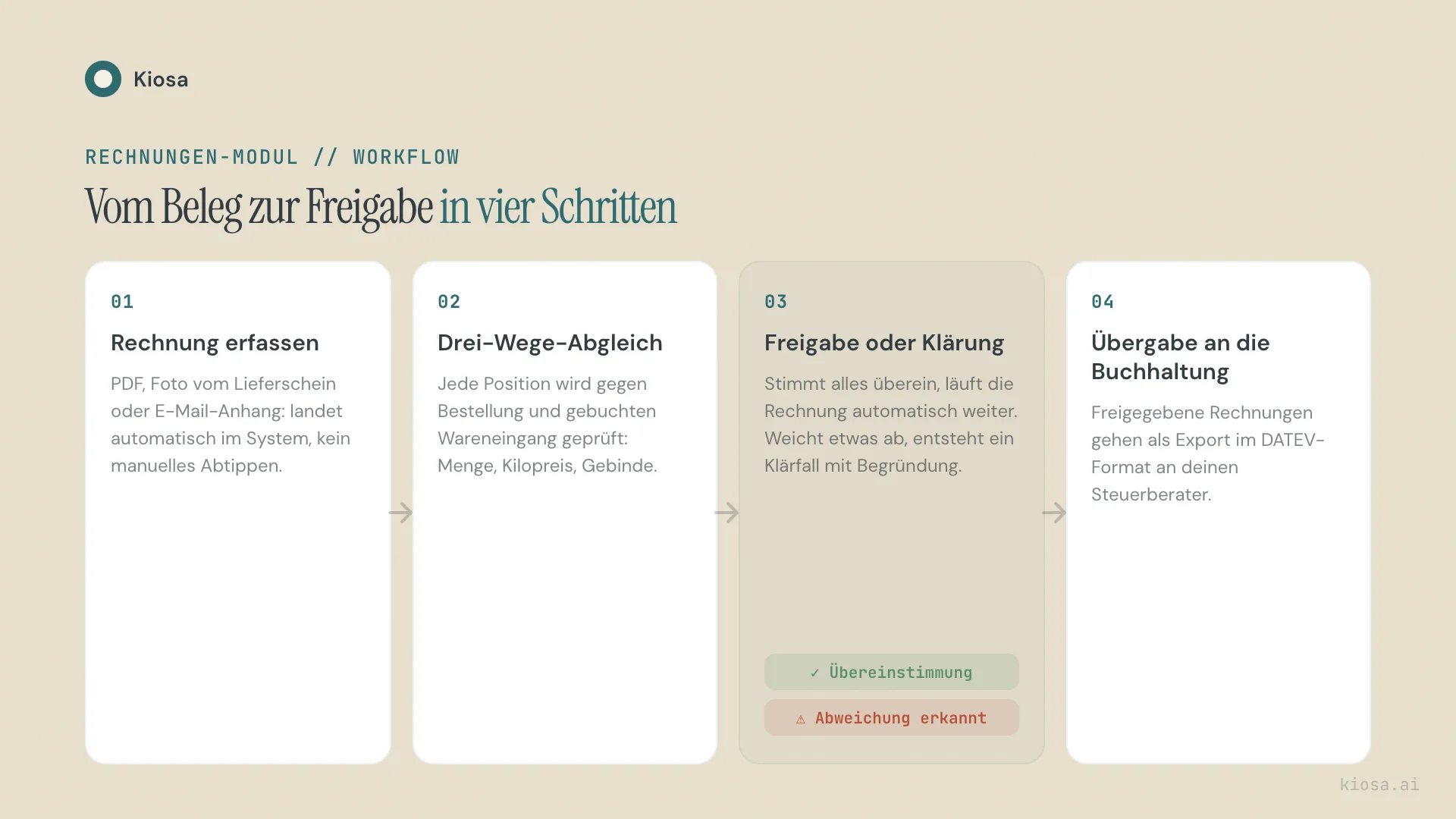
The process can be described in four steps, whether there's software behind it or a person with a spreadsheet.
1. Capture the invoice. PDF, photo of the delivery note or email attachment: the documents have to land in one place where they're captured in machine-readable or at least structured form. Without this step, any further automation stays theoretical.
2. Three-way match. Every invoice line is checked against the order and the goods receipt: quantity, price per kilo, pack size, item number. If everything matches, nothing else happens, and that's exactly the point. A system that sends a notification for every unremarkable invoice gets ignored after two weeks.
3. Approve or clarify. If everything matches, the invoice moves on to payment automatically. If something deviates, a query is raised with a concrete reason. "Price per kilo buffalo mozzarella +8% vs. last delivery" is something different from "invoice deviates". The reason decides whether someone can respond in five minutes or in half an hour.
4. Hand over to accounting. Approved invoices go to accounting. With Kiosa that means the approved document is coded to the right accounts and ready for export to your accountant, instead of sitting in a folder until the next appointment.
The difference between a business that has this process and one that doesn't rarely shows on a single document. It shows in how quickly a deviation is noticed: on the day of delivery, or only weeks later at the stock count.
Worked example: a silent price increase in the match
A worked example with a fictional sample business, not a figure from a real one. Take a restaurant that regularly buys a particular olive oil, 40 litres a week.
In June the price per litre is €8.90. By December it rises in small steps to €9.70, only a few cents per delivery note each time, never an announcement, never a price list that stands out. Without a comparison against the previous invoice, this development disappears in the normal noise of weekly orders.
With the plan vs. actual match it looks different: the difference of €0.80 per litre times 40 litres a week times 52 weeks comes to €1,664 of extra cost a year, for a single item, if nobody is looking. With ten to fifteen core items drifting in a similar way, this one number quickly becomes an amount that costs real margin.
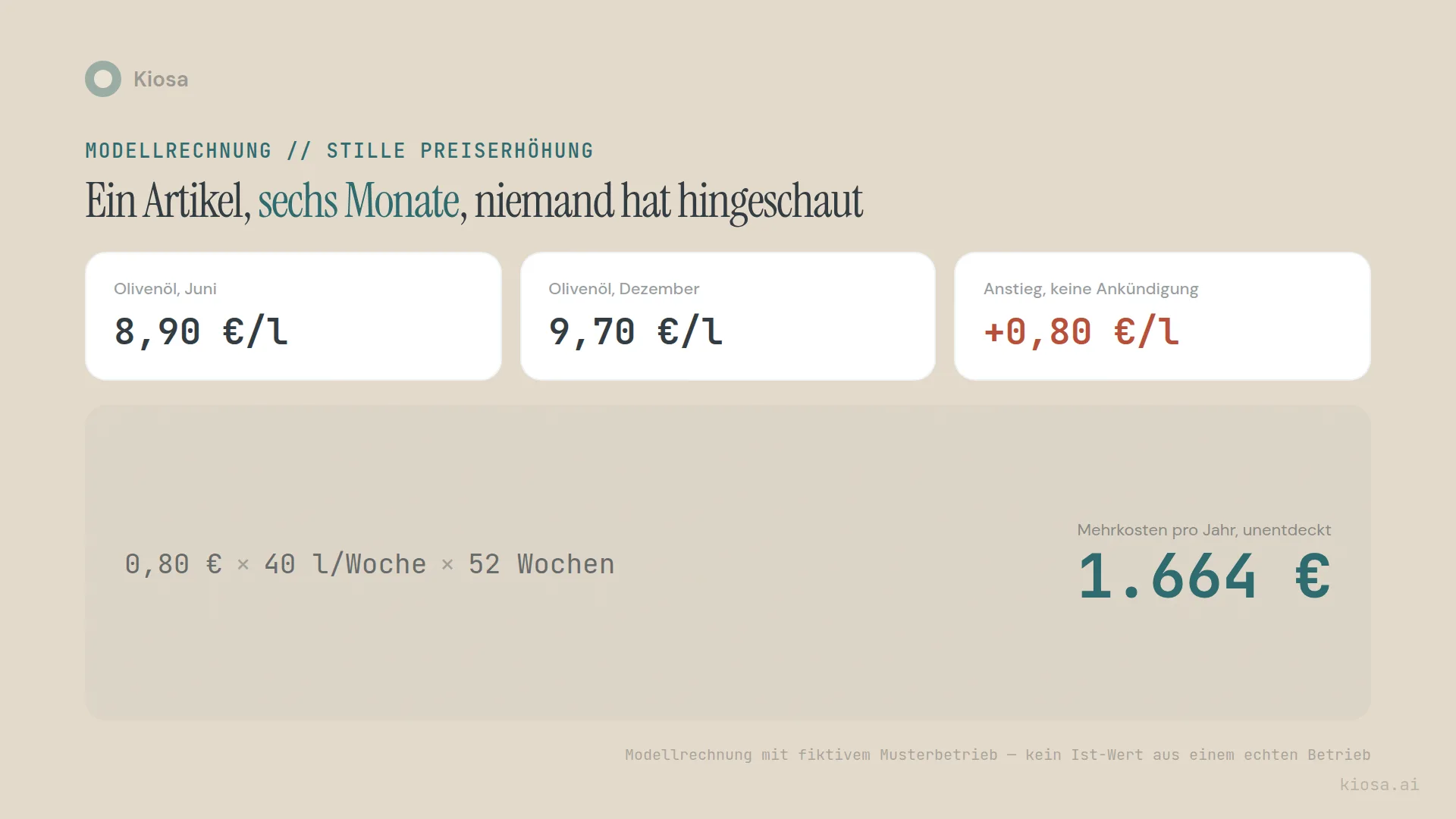
The point of this example isn't the exact sum; that depends on the business, the item and the period. The point is the mechanics: a price increase of a few cents is invisible on a single invoice. Multiplied over 52 weeks it becomes visible. An automatic match does exactly this multiplication in passing, while hardly anyone follows it through consistently by hand.
How to set up the match, with and without software
You don't need a software project to start with the three-way match. You need a structure you can automate later.
Without software: keep a simple table for your 15 to 20 highest-spend items with price per kilo, pack size and supplier. On every delivery, compare the delivery note with the matching invoice before it's approved for payment, not afterwards. At a rough estimate that costs 20 minutes per supplier per week, but it's the difference between "we check" and "we hope it's right".
With software: a system like Kiosa's Invoices module does exactly this match automatically. Documents arrive in Kiosa by email, delivery notes are matched to the right invoice and quantities checked, and duplicate documents are detected. The actual vs. theoretical food cost comparison, meaning the match between recipe cost and actual usage, continues with the same goods receiving data. Invoice matching and food cost control are two stages of the same data flow, not two separate projects.
What software also delivers is anomaly detection: instead of only fixed rules, it recognises patterns that become conspicuous over time, even when a single deviation is within tolerance on its own. That's the difference between "this one invoice is wrong" and "this supplier has been drifting upwards for three months".
Kiosa's Invoices module costs €99 per location per month as an add-on to One View (€99), with no setup fee. Combined with the Inventory module (€49 per location per month), it covers the whole chain from order to food cost percentage.
What changes when invoices are coded and export-ready straight away
The biggest effect of an automatic match doesn't show on the single invoice, but in how quickly you know where you stand financially.
The classic way: invoices pile up, get handed to the accountant in a bundle at month end, and the management accounts arrive weeks later. By then every price deviation is long in the past. If the three-way match runs directly at goods receiving, on the other hand, the invoice is coded on the day of approval and ready for export, without manual re-keying.
The result is a P&L that shows current food cost instead of a snapshot from six weeks ago. For steering, that means you see a cost development while it's happening, not once the month is over and nothing can be changed any more.
Is this the same as e-invoicing?
No, even though the two are often confused. Where e-invoicing rules apply, they govern the format of an invoice: structured electronic invoices instead of paper or PDF. This article, by contrast, is about the content of the invoice: whether the numbers are right, not which file format they arrive in. The two topics touch, because a structured e-invoice makes the automatic match technically easier, but they solve different problems.
From analysis to action
What this is about: capturing supplier invoices digitally and checking them against the delivery note before they are paid.
Put it into practice: Kiosa Invoices for receipt intake, approval and export
More on Controlling and finance
- Restaurant Financial Controlling: What to Measure Daily, Weekly and Monthly
- Restaurant Cash Flow Forecast: 13 Weeks Instead of Your Bank Balance
FAQ
What's the difference between a two-way and a three-way invoice match?
A two-way match checks the invoice only against the order. A three-way match also checks it against actual goods receiving, meaning the delivery note or the booked delivery. In restaurants, the three-way match is the sensible standard, because quantities and pack sizes of fresh produce can change constantly without the order or the invoice reflecting it automatically.
How do I spot supplier invoices that have been charged twice?
Most reliably through an automatic match against document numbers already posted. If an invoice or delivery note number enters the system a second time, it's flagged before it's approved for payment again. Manually, a simple list of all posted document numbers per supplier, checked before every new approval, helps: laborious, but doable with a manageable number of suppliers.
Do I have to digitise supplier invoices, or is paper filing enough?
Digitisation alone, a scan instead of paper, achieves little on its own. The value only comes from the match against order and goods receiving. Paper filing could in theory do this match too, but the effort per invoice is much higher, and patterns over several months are almost impossible to follow by hand.
What does a digital invoice match have to do with e-invoicing requirements?
Not much directly. E-invoicing requirements govern the file format of an invoice. The plan vs. actual match checks the content: whether quantity and price are right. A structured e-invoice makes the automatic match technically easier, but doesn't replace it.
How long does it take to introduce a digital invoice match?
That depends less on the technology than on the groundwork: orders and goods receipts have to be recorded cleanly, otherwise the match has nothing to check the invoice against. Businesses already using an inventory module have an advantage here, because the goods receiving data is already there.
Your next steps
Three things you can do this week:
Take a sample. Take the last five delivery notes from a core supplier and hold them against the matching invoices. Count the deviations: not the sum in euros, just the number of lines that don't match exactly.
Check document numbers. Go through the last three months and see whether any invoice number appears more than once. It's the fastest way to find a duplicate charge without needing a system for it.
Define the process. Decide who on the team checks the three-way match before an invoice is approved for payment, not afterwards.
If you want to automate the match: Kiosa's Invoices module matches delivery notes to the right invoice, detects duplicate documents, guides you through approval and codes approved documents ready for export to your accounting. Together with the food cost calculator, you'll see in a few minutes where your food cost percentage stands today.
Book a free demo call: together we'll look at how many of your invoice lines actually match the delivery note.
Related articles
- Restaurant supplier price increases: comparing prices over time, when the single invoice is already correct
- Actual vs. theoretical food cost: what happens after the invoice has been checked and posted
Related terms
- Anomaly detection: how automatic pattern recognition goes beyond the fixed plan vs. actual match
- Food cost ratio: the KPI that shows in the end whether the invoice match has paid off
